
Is Your Project Management Software Built for the Field?

February 11, 2026

Share this article

When most people think of project management software, they imagine someone sitting at a desk—clicking between tabs, uploading documents, sending tasks to coworkers via a dashboard. But if your business relies on field crews—whether it’s construction, inspection, or service work—that kind of software falls short.


Most platforms weren’t built for boots-on-the-ground operations. And when your field team struggles to use the system, communication breaks down, reports get delayed, and deadlines slip.


In this post, we’ll show you what real field-ready project management software looks like—and how the right tool can improve both operations and office alignment.

What Is Field Project Management Software?

Field project management software is a platform designed to support workers who aren’t sitting at a desk—people on jobsites, in service vehicles, or inspecting facilities. It allows your team to track tasks, document progress, submit reports, and communicate with the office from the field, using mobile-friendly tools that work in real-world conditions.


Unlike traditional systems built for office use, field-ready software is:


  • Mobile-first
  • Easy to use on phones or tablets
  • Functional even with low connectivity
  • Integrated with reporting, quoting, or time-tracking tools your crews already need

Why Traditional Project Management Tools Don’t Work for Field Teams

Here’s what we often hear from clients before they switch to a better system:

  1. “Our field team barely uses the platform.”
  2. “They just text us photos because logging in takes too long.”
  3. “We have to re-enter all their notes into our office system.”


These are symptoms of one core problem: your tools weren’t built for the way your field crews actually work.

Here’s where traditional tools fail:

  • Too many clicks to log one task or upload a photo
  • No offline functionality, making the platform useless in remote areas
  • Interfaces designed for desktops, not mobile devices
  • Disconnected systems—forcing field staff to text or email instead of logging updates


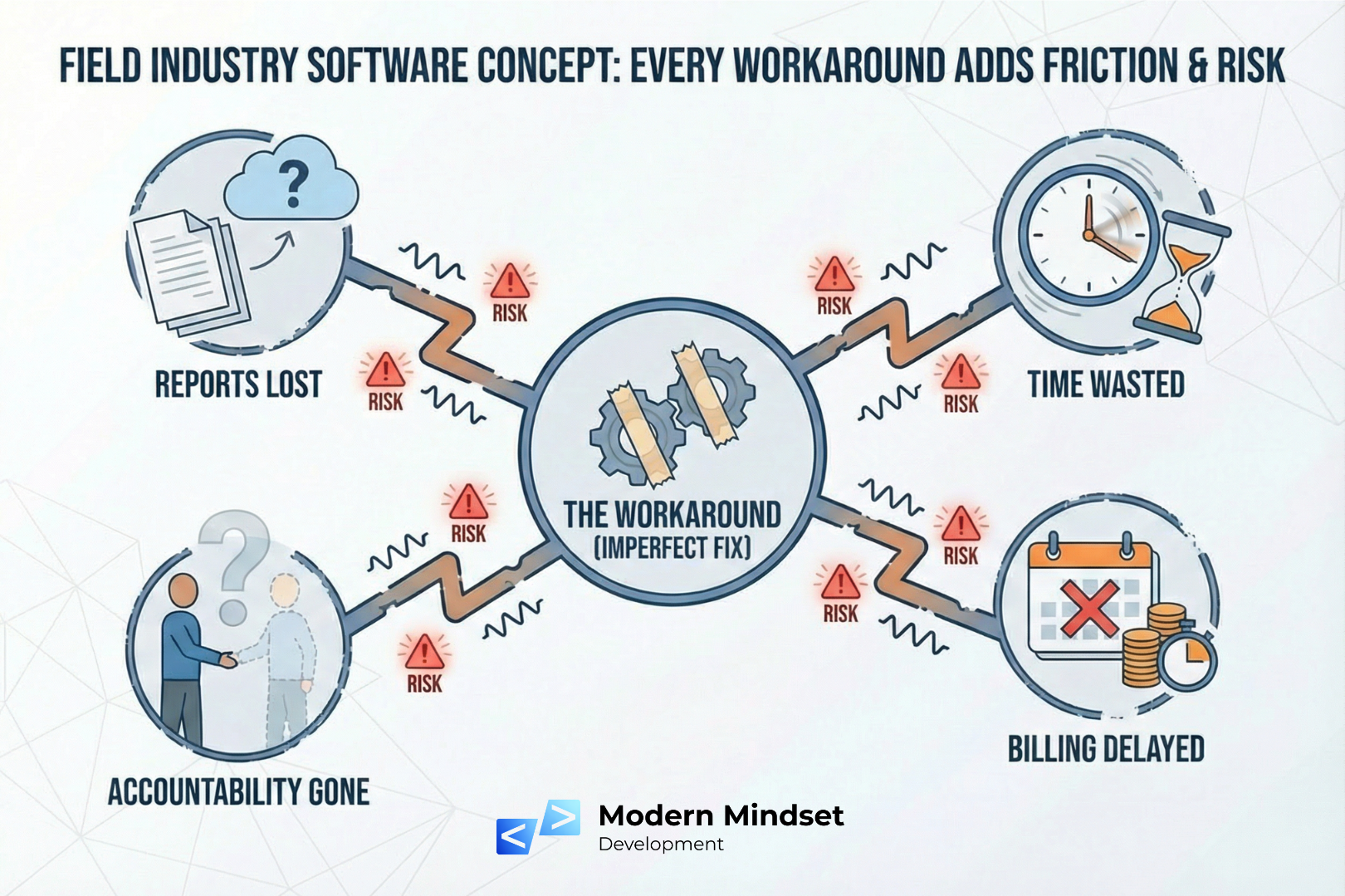
And every workaround adds friction and risk:


  1. Reports get lost
  2. Time gets wasted
  3. Billing gets delayed
  4. Accountability goes out the window
Diagram showing the real cost of bad software: reports lost, time wasted, accountability lost, billing delayed, all leading to risk. By Modern Mindset Development

What Makes Software Truly Field-Ready?

If you’re evaluating project management systems for your field teams, look for tools that include:


1. Mobile-First Design


The platform should feel intuitive on a smartphone—not just “usable,” but fast and friendly. No pinch-to-zoom required.


2. Simple, Fast Reporting Tools


Field workers should be able to:


  • Snap a photo
  • Log a note
  • Submit a quick checklist


…all within seconds, without switching between apps.


3. Offline Mode or Auto-Save in Low Signal


If your crew works in areas with spotty coverage (think: basements, rural job sites), offline functionality is non-negotiable.


4. Two-Way Sync Between Field and Office


Whatever happens in the field should be visible in the office in real-time—and vice versa. Updates, documents, and task changes shouldn’t get stuck in someone’s inbox.


5. Built-In Tools for Quoting, Invoicing, or Time Tracking


If your crew already handles this in the field, integrate it. Fewer systems = fewer errors.

How Modern Mindset Builds for the Field: Introducing Lift Office

At Modern Mindset Development, we work with companies that don’t fit the mold—especially those with both field crews and office teams. That’s why we built Lift Office, our flagship platform designed from day one to support:


  • Construction companies
  • Specialty trades
  • Service contractors
  • Field inspection teams


Lift Office includes:


  • Field reporting tools that take seconds, not minutes
  • Offline capabilities for remote job sites
  • Photo + file uploads directly from mobile
  • Quoting and invoicing tied directly to job progress
  • CRM and project tracking that keeps field and office in sync


We don’t just hand you software—we help you solve the root problems first. Then we tailor the solution to fit your workflows, not the other way around.

What Happens When You Use the Right Field Project Management Tool?

Here’s what our clients report after switching:


✅ Faster job closeouts
✅ Fewer missed details
✅ Smoother office ↔ field handoffs
✅ Better forecasting and billing accuracy
✅ Happier crews who don’t feel like they’re fighting their own tools


If your current project management system wasn’t built for the field, you’re not just dealing with minor annoyances—you’re losing time, money, and trust every day.


The good news? You don’t need to “make do.” You need software that’s actually made for you.


Ready to see what field-first project management looks like?


📅 Book a quick demo of Lift Office.


We'll show you how it works—in the field, not just in a slideshow.

Recent Posts

Announcement graphic: Modern Mindset Development partners with ASL Education Center.
April 7, 2026
Modern Mindset Development partners with ASL Education Center to build custom software and tools that enhance ASL assessment, testing, and accessibility for schools and organizations.
A person wearing a yellow hard hat and orange safety vest stands at a construction site, looking toward a crane.
March 27, 2026
Discover where construction workflows break. Learn how hidden gaps between field, office, and systems slow operations and delay revenue.
An aerial view of a busy construction site with cranes and buildings under construction, topped by the title text.
March 23, 2026
Off-the-shelf software often fails growing construction companies by creating workflow gaps, poor field-to-office communication, and costly inefficiencies. Learn why—and what to do instead.
Image of Lift Office logo
March 6, 2026
Learn what Lift Office is and how it helps crane & rigging companies streamline operations, manage jobs, improve field reporting, and simplify quoting and invoicing.
Maneessha Bommineni welcome post graphic for Modern Mindset Development
February 25, 2026
Meet Maneessha, a software developer joining Modern Mindset with expertise in Java, Spring Boot, ReactJS, and AWS, driven by growth and innovation.
Lines of code on a dark screen, likely Python, with highlighted syntax and variables.
January 8, 2026
Why tools like Lovable and Base 44 can fall short for real businesses—and how custom software delivers better security, flexibility, and long-term value.
Cheek Stock promoting inventory management, featuring a screenshot of software interface.
December 31, 2025
See how Trailhead Printing used Cheeky Stock to eliminate stockouts, simplify inventory, and stay ahead with smart alerts—built by Modern Mindset Development.
Light bulb inside a white chalk-drawn thought bubble on a black chalkboard.
November 6, 2025
Discover how Modern Mindset Development helps mid-sized businesses solve real problems with custom software—by diagnosing before building. A smarter, tailored approach to tech.
Nikhil Komatineni, Senior Developer, wearing plaid shirt. Welcome sign over head, website address at bottom.
September 24, 2025
Modern Mindset Development welcomes software developer Nikhil Komatineni, bringing product ownership, problem-solving, and passion to the team.